
Report shows recent correspondence added to the system either by importing from Mailbox or sending via integrate.
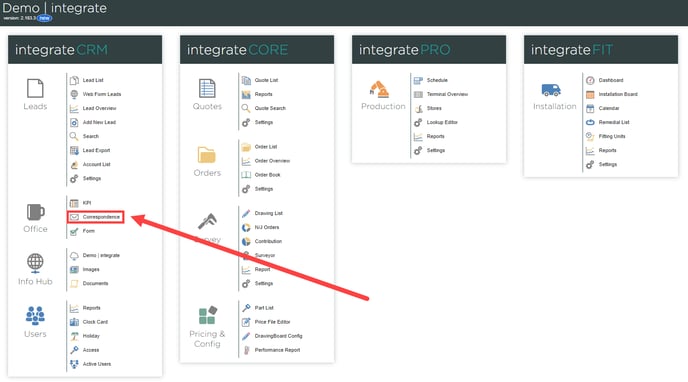
1. The Correspondence tab enables users to access a comprehensive record of recent interactions between staff and clients within the Integrate system. You can easily find the Correspondence tab in the CRM module on the left side of the Integrate interface, under the "Correspondence" button.
2. Once the user has successfully navigated their way to the correspondence page they will be presented with the initial correspondence table which consists of:
- Lead Number (E.g L33271)
- Surname (E.g Smith)
- Date (Format DD/MM/YY Time)
- Method (E.g Email)
- Type (E.g New Appointment)
- Recorded (E.g AL)
- By (E.g AL)
- From (E.g alex.lovick@endtoend.com)
- To (E.g Demo@endtoend.com)
- Subject (E.g Sales Visit)
3. Users have the ability to adjust the date range for the displayed correspondence by utilising the dropdown menu located on the right side of the page. This menu offers several options for filtering the correspondence, including:
- Day
- Week
- Month
- Year
- Custom Range
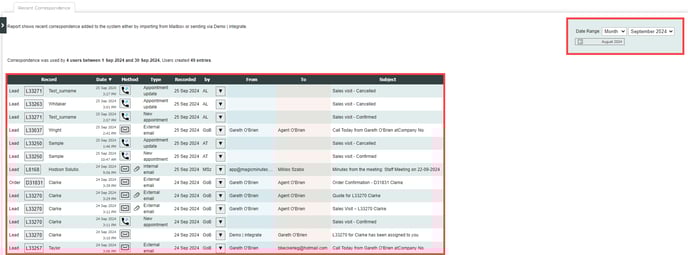
4. The correspondence tab also displays the total number of interactions recorded by the system within the specified date range, providing users with a clear overview of communication activity.

NO EVENTS ARE SHOWING ON MY CALENDAR
Please see below for details
1. If you have added an event to your calendar and it is not appearing, please check the display filters that are currently enabled. If all the filter boxes are unchecked, no events will be shown. Simply select the appropriate boxes to enable the desired categories, and the calendar will refresh to display the updated events.
