
This article assumes some prior knowledge of rule editors. For the basics on rule editors, including how to write conditions, see Working with rule editors.
Cost Plus vs Price list
There are two basic approaches to price files: Cost Plus and Price List. Cost plus takes a granular approach to calculate the cost of each window based on material costs, production labour, and installation, and then adds a markup to that cost to work out the price. This method would normally pull values from other parts of the system, such as production hours from the Estimated Labour Time page, and ironmongery costs from the part list, which are then fed into the calculation. The Price List approaches uses a pre-determined list of different window configurations and sizes with a set cost or price for each. The Price List approach may still calculate certain additional costs using a Cost Plus approach, such as glass and ironmongery cost, but the base cost of each item will be a fixed cost based on item type and size.
The advantage of Cost Plus is that it is more precise, and allows for prices to be easily tweaked by adjusting a particular detail such as a material cost. The advantage of Price List is that it is easy to grasp and can be set up based on an existing price catalogue or spreadsheet, and it keeps all pricing information in the same place.
Cost Plus
Timber costs
The Price File editor has built-in variables rules for calculating timber volume based on the drawing. These figures are calculated in cubic decimetres; to convert this to cubic metres, simply divide by 1000.
- Frame timber volume can be calculated on the item-level loop using the variables frame_excl_cill_volume and cill_volume. These variables calculate the total timber volume regardless of material. There are also corresponding volumes for each type of timber, e.g. accoya_frame_excl_cill_volume and accoya_cill_volume.
- Sash timber volume can be calculated on the sash, sliding sash, casement sash, or door leaf loops. On each loop there is the volume variable which includes all materials, and the material-specific variables such as accoya_volume.

Then you can create a rule like this, multiplying the timber volume by the cost per cubic metre.
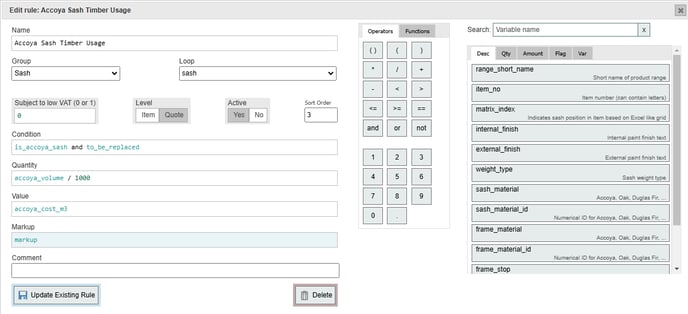
Note that in this example, markup is a custom variable, allowing the markup to be easily adjusted across all rules.
Glass costs
There are a few different ways to calculate glass costs. One is to add the square metre cost for each type of glass in the part list.
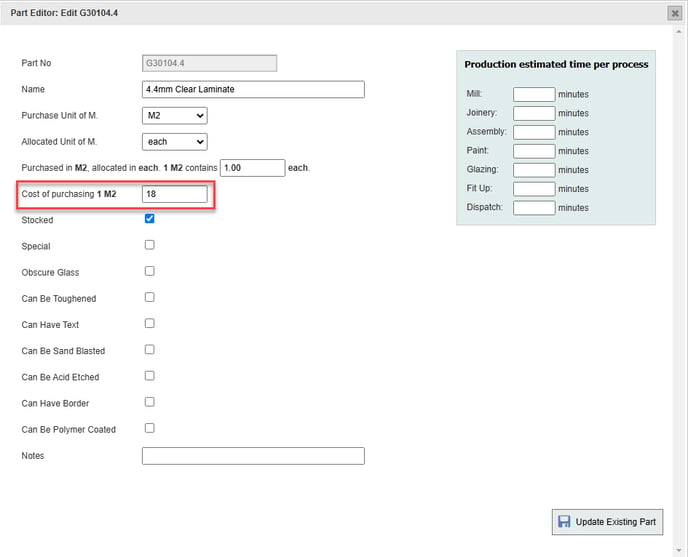
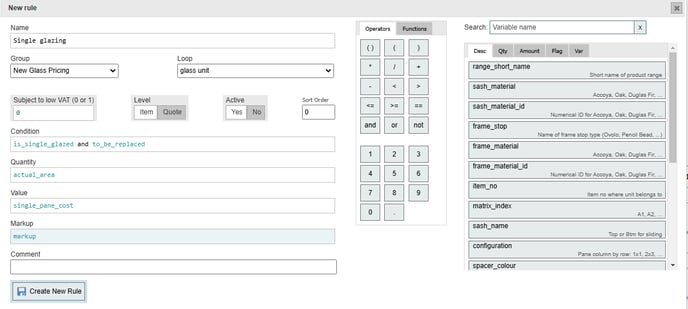
This value can then be pulled using the cost variables on the glass unit loop: single_pane_cost, inner_pane_cost, middle_pane_cost, outer_pane_cost. This approach requires a minimal number of glass pricing rules. For example, all single glazing would be covered by a rule like this:
 And all double glazing can be covered by another rule: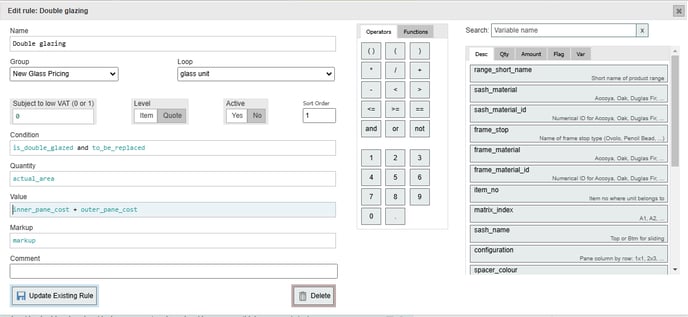
The variable actual_area calculates the area of the glass unit in square metres to 2 decimal places. rounded_area does the same but rounds anything less than 0.3 m2 up to 0.3 m2, allowing a minimum glass charge to be built in to the pricing rules.
If you decide on this approach, we would recommend using separate glass parts in the part list for toughened glass, rather than the "can be toughened" tickbox. This way you can assign a different cost value for toughened glass without needing to write complex pricing rules using the toughened glass variables.
The Part List approach has the advantage of simplicity, but it does require glass costs to be kept up-to-date in the part list, and there is less flexibility for tailoring prices based on different factors. An alternative approach is to write separate pricing rules for each type of glass or combination of glass types, and defining the cost within the price file itself. If you have a lot of glass parts in your system, it will be easier to group them using custom variables, with each group being priced the same. For example you may have a standard_glass variable which includes several glass parts from the part list:

Then you can write pricing rules using the in_list() function, e.g.:
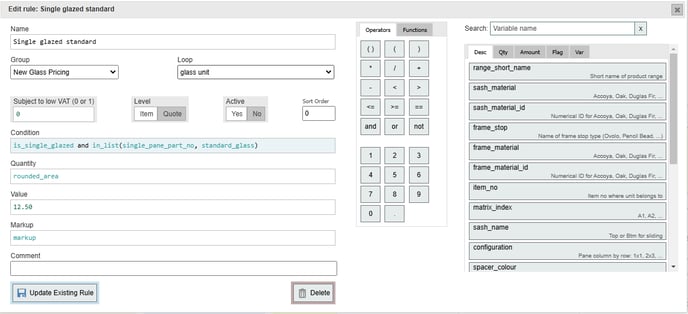
This gives us more flexibility, as double glazing won't necessarily be double the single glazing price per square metre:
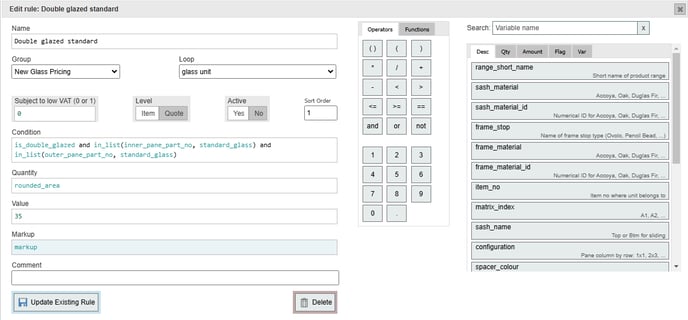
We could further tailor the conditions to price differently for different ranges, types of window etc, but this will necessitate more rules.
Ironmongery/hardware
The easiest way to price ironmongery is using a Cost Plus approach based on the cost per part in the part list. One rule on the ironmongery part loop can suffice, which could be as simple as this:
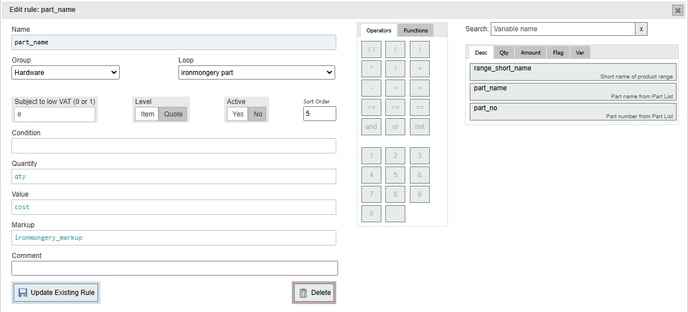
cost is the cost of the part in the part list, and qty is the number of units assigned.
Sash weights do not count as ironmongery, so will require a separate rule, e.g.:
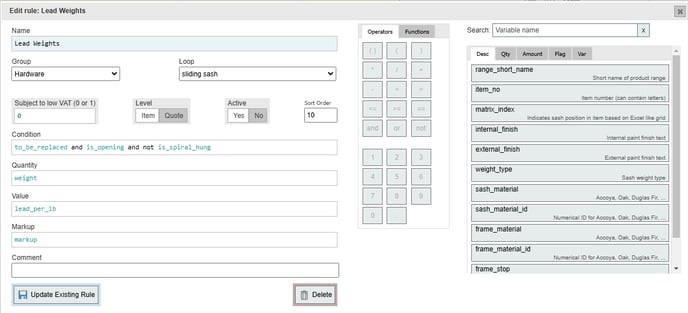
The weight variable on the sliding sash loop returns sash weight in lbs; for kilograms, use weight_in_kg. In this example lead_per_lb is a custom variable which defines the cost of lead weights per lb.
Production labour costs
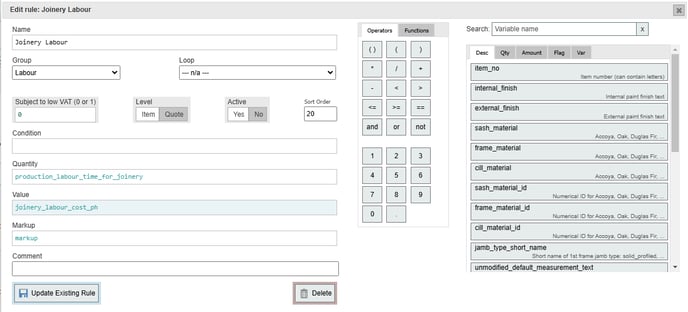
If you have configured production labour rules in the Estimated Labour Time editor, this information can easily be pulled into the price file using a few variables. There will always be a variable on the item-level loop called production_labour_time, which pulls the total time calculated by the production labour rules for that particular item. There will also be a separate production labour variable for each production process, allowing you to set different labour costs for each process. We can define the hourly rate for a process using a custom variable:

and then write a simple rule to multiply the production time for that process (in this case Joinery) by the hourly rate that we have set:
Installation labour costs
Likewise, if you have configured rules for calculating installation labour time in the Fitting Units/Installation Labour editor, you can easily pull this information through to the price file. As with production labour there will be an overall variable for total installation_labour_time, plus individual variables for each of the groups in the Fitting Units editor. We can define the hourly rate for installation either directly in the rule or, as below, using a custom variable: 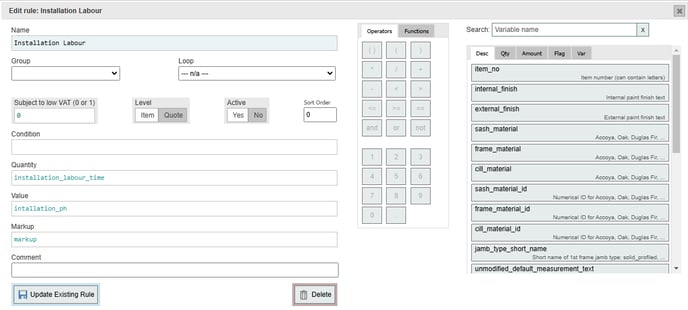
Price List
Price List tends to require more rules, and more complex rules, than Cost Plus. The most common approach is to price windows according to overall frame area. You will likely have separate pricing groups for sliding sashes, casements, and doors, perhaps further broken down into single, double etc sashes. This is normally done on the frame loop, using the area variable. You will need to add additional rules for different material types,