![End to End logo dark landscape cropped-01.png]](https://26925870.hs-sites-eu1.com/hs-fs/hubfs/End%20to%20End%20logo%20dark%20landscape%20cropped-01.png?height=40&name=End%20to%20End%20logo%20dark%20landscape%20cropped-01.png)
Key Points: Editing the Stable Door Meeting Rail
1. Enable features in the property visibility tab.
From the DrawingBoard config page, select gapBetweenMeetingStiles and meetingStileOvelap.
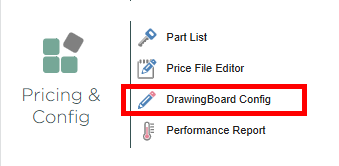
2. Select the stable door meeting rail.
From the visibility tab, select part filter, then stableDoorPart. Under property filter, search for meetingStile.
3. Enable the properties.
Remove the both hidden option.
4. Start using the editor.
Create a new door drawing.
5. Make a stable door.
Select the interior of the door, click the change button on the bottom right. Select the stable door option from the product type selector menu.

6. Access the meeting rail editor.
Using explorer on the right-hand side of the screen, select stable door to open the property editor on the left-hand side. Select one of the following properties to access the meeting rail editor:
a. Midrail Inc. X mm gap
b. Midrail gap
c. Midrail overlap
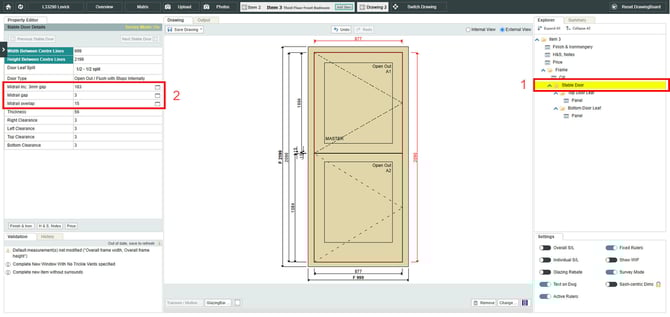
7. Change meeting rail measurements.
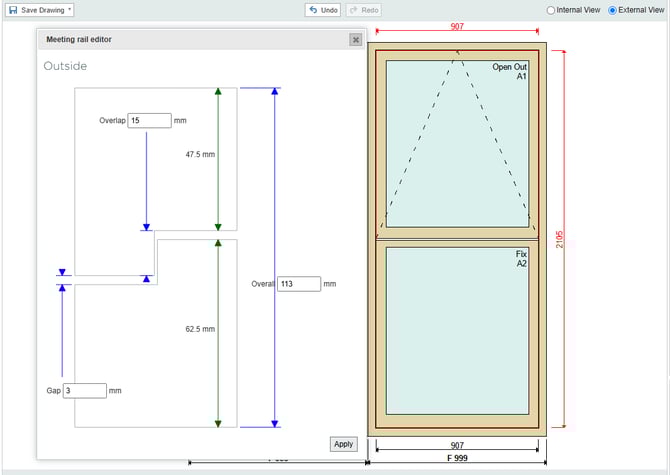
In the property editor, change the overlap, gap and overall size of the meeting rail. Enter the desired values into the property boxes. Once satisfied with the measurements, click apply in the bottom right of the meeting rail editor.
Note: In the property editor, midrail Inc Xmm gap will change the text on based on the values entered, showing gap size is Midrail Gap is hidden.

8. Using the meeting rail editor for floating transom casements.
Set overlap, gap and overall size of the meeting rail within floating transom casement windows, using the meeting rail editor.