![End to End logo dark landscape cropped-01.png]](https://26925870.hs-sites-eu1.com/hs-fs/hubfs/End%20to%20End%20logo%20dark%20landscape%20cropped-01.png?height=40&name=End%20to%20End%20logo%20dark%20landscape%20cropped-01.png)
Symptom: when trying to load the PDF version of one of the production outputs (commonly the Installation Information Sheet), the page fails to load properly, and you just see this message:

Solution: this can be caused by the Adobe Acrobat PDF extension in Google Chrome. Disabling it will normally fix the problem:
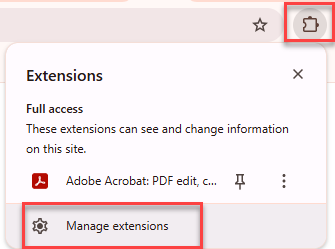
- Click the puzzle piece icon in the top right of Chrome, then "Manage Extensions". (You can also access this page via the main Settings page.)
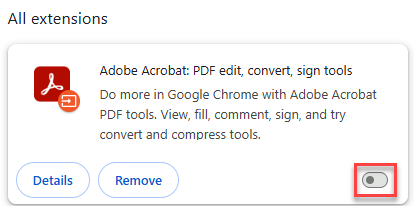
- Disable the Adobe extension by clicking the switch so that it changes from blue to grey.
- If this doesn't work, try disabling any other extensions that can view or edit PDFs.
If you are still having problems after attempting the above steps, please contact EndtoEnd support (support@endtoendit.com / 01422 761977).