Skip to content
English
  • There are no suggestions because the search field is empty.

Generating KPI Reports

Track performance metrics and sales progress in real time.

Find out how to generate reports based on Key Performance Indicators (KPIs) to provide a valuable insight into how a business is performing, track progress toward specific goals and objectives, and make data-driven decisions.


Step-by-Step: Generating KPI Reports

Step 1 – Go to the KPI page.                                                                                                                                                         From integrateCRM home page, click on KPI.

Step 2 – Find KPI settings.                                                                                                                                                              Click KPI settings button in top-right corner. 

Step 3 – Select report timeframe.                                                                                                                                           Select the reporting period - day, week, month, or year. 

 

Step 4 - Select organisation.                                                                                                                                                                 If sub-domains are set-up, choose the relevant organisation for the report. 

 

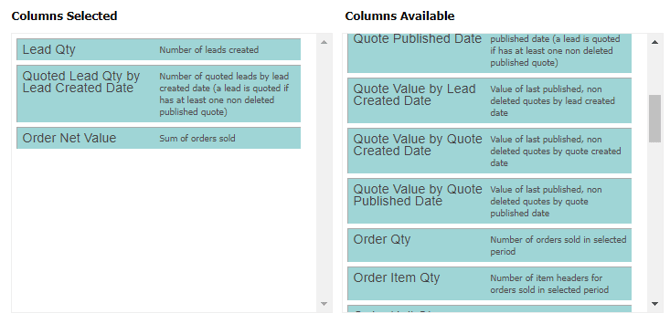
Step 5 - Select criteria.                                                                                                                                                                        Drag and drop desired criteria from columns available to columns selected. 
 

Step 6 - Save the report.                                                                                                                                                                        To return to the report later, click save for later. Set to public, to allow other users to access.

 

Step 7 - Generate the report.                                                                                                                                                       Click save and reload to generate the KPI report.