![End to End logo dark landscape cropped-01.png]](https://26925870.hs-sites-eu1.com/hs-fs/hubfs/End%20to%20End%20logo%20dark%20landscape%20cropped-01.png?height=40&name=End%20to%20End%20logo%20dark%20landscape%20cropped-01.png)
Key Points: Configuring Finished and Unfinished Sizes
1. Understanding the terminology.
Terminology originates from the early days of the system. Finished and unfinished, are also referred to as jamb and profiled jamb sizes. The following terminology is used:
a. Finished Frame = Unfinished Frame + Stop Size. Used for frames with plant-on stops.
b. Jamb = Profiled Jamb + Machined Out from Jamb. Refers to solid profiled frames.
Key Points - Traditional / Heritage Sections
1. Example 1 - Simplest scenario.
For both finished frame and jamb, the result is the same. An example of the simplest scenario, 40 mm unfinished frame, and 20 mm stop size, gives simple frame and sash shapes.

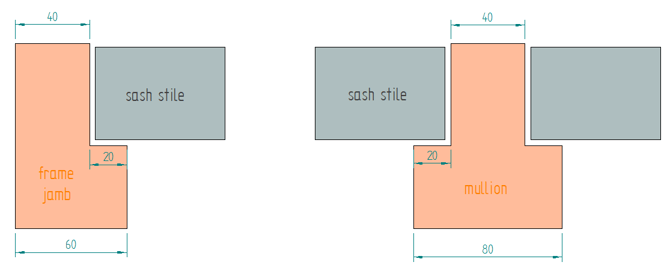
From the default values page, configure properties, example shown below:


-png.png?width=354&height=162&name=unnamed%20(1)-png.png)
-png.png?width=363&height=114&name=unnamed%20(2)-png.png)
Note: Back end works with unfinished frame & stop size, and calculates finished frame on front end.
Key Points: Flush Casement and Door with Multiple Rebates
1. Using multiple rebates for better insulation.
To achieve better insulation, frames and sashes are made with multiple rebates, which means the actual sectional details may get more complicated. It is crucial to obtain the correct key measurements when configuring default values.
2. Example 2 - Multiple rebates.
An example for modern high performance window and door sections.
-png.png?width=670&height=294&name=unnamed%20(3)-png.png)
Use the following steps to translate these complicated shapes into integrate:
a. Width - Create clearance around sash at the point where sash stile was obtained (5 mm used in example)
b. Mechanical clearance - Create bounding rectangle of sash stile (70 mm used in example)
-png.png?width=484&height=184&name=unnamed%20(4)-png.png)
Frame measurements depend on sash details above:
a. Unfinished frame jamb size - Obtained where sash stile and clearance were recorded (30 mm in given example)
b. Unfinished mullion size - From where sash stile & clearance were recorded (20 mm in given example)
c. Stop size - Calculated based on unfinished and finished sizes. Since frame jambs and mullions are machined using the same cutter, the result of these two calculations should be the same (30 mm in given example), calculate as follows:
Frame Stop Size = Finished Frame Jamb - Unfinished Frame Jamb
Mullion Stop Size = Finished Mullion - Unfinished Mullion
-png-1.png?width=360&height=148&name=unnamed%20(5)-png-1.png)
-png.png?width=359&height=141&name=unnamed%20(6)-png.png)
Assuming the item created in Example 2 is an opening out casement, looking at the finished product externally, the customer will see a 20 mm mullion with 5 mm clearance and 70 mm sash stile. Presentation simplified to focus on the internal and external faces of the item, not the middle.
Note: By obtaining measurements this way, the visual appearance on the drawing will also be correct.
Key Points: Stormproof Windows
1. Available operations for stormproof windows.
Stormproof items in integrate are opening out casements, where the sash overlaps the frame externally. Operations available are the same as flush casements.
-png.png?width=417&height=42&name=unnamed%20(7)-png.png)
2. Example 3 - Stormproof section.
When obtaining key measurements, select the correct reference points from the reference CAD drawing.

-png.png?width=670&height=310&name=unnamed%20(8)-png.png)
3. Example 3 - Stormproof section frame sizes.
Looking at the external frame, the width (38 mm in this example) is the reference point where the frame is split to unfinished and stop sizes. The sum of these sizes gives the finished frame jamb, the internal face of the frame (58 mm in this example).
-png.png?width=331&height=163&name=unnamed%20(9)-png.png)
Once stop size is determined, unfinished mullion size can be calculated, since it is known the same profiler cutter is used for both frame jamb and mullion, therefore, stop sizes are the same.
4. Example 3 - Stormproof section sash sizes.
Looking at the external face of the frame, the clearance between the frame and sash can be obtained (5 mm in this example). This is the second reference point, where the sash to stile and overlap is split (58 mm and 12 mm in this example). Setting these details correctly will ensure glass sightline details are correct.
-png.png?width=471&height=221&name=unnamed%20(10)-png.png)
Key Points: Tilt and Turn Windows
1. Available options for tilt and turn windows.
Tilt and turn items in integrate are opening in casements where the sash overlaps the frame internally. Operations specific to tilt and turn casements are bottom left and bottom right.
-png.png?width=612&height=45&name=unnamed%20(11)-png.png)
2. Example 4 - Tilt and turn windows.
When obtaining key measurements, select the correct reference points from the reference CAD drawing.
-png.png?width=670&height=234&name=unnamed%20(12)-png.png)
3. Example 4 - Tilt and turn windows frame sizes.
Looking at the external frame, the width (40 mm in given example) is the reference point where the frame is split to unfinished and stop sizes. The sum of these sizes gives the finished frame jamb, the external face of the frame (75 mm in given example).
-png-1.png?width=347&height=158&name=unnamed%20(13)-png-1.png)
Once stop size is determined, unfinished mullion size can be calculated, since it is known the same profiler cutter is used for both frame jamb and mullion, therefore, stop sizes are the same.
4. Example 4 - Tilt and turn sash sizes.
Looking at the internal face of the frame, the clearance between the frame and sash can be obtained (10 mm in this example). This is the second reference point, where the sash to stile and overlap is split (55 mm and 15 mm in this example). Setting these details correctly will ensure glass sightline details are correct.
-png.png?width=469&height=222&name=unnamed%20(14)-png.png)