![End to End logo dark landscape cropped-01.png]](https://26925870.hs-sites-eu1.com/hs-fs/hubfs/End%20to%20End%20logo%20dark%20landscape%20cropped-01.png?height=40&name=End%20to%20End%20logo%20dark%20landscape%20cropped-01.png)
What is the estimated minutes report ?
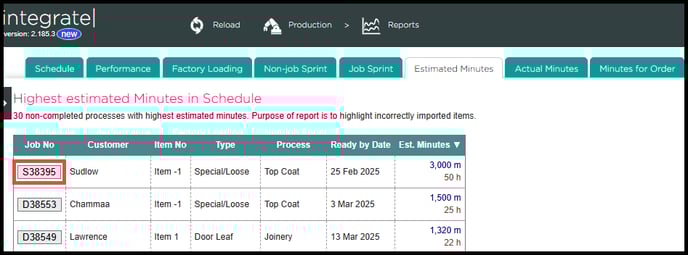
This report shows an overview of the top 30 jobs with the highest estimated minutes within your production system.
How to locate the estimated minutes report ?
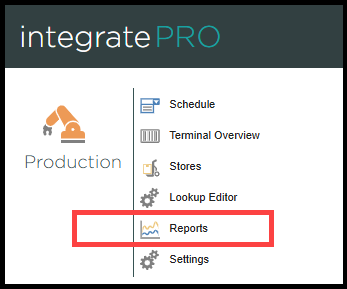
Step 1. The factory loading report can be located from the main Integrate home page under the 'IntegratePro' module by clicking the 'Reports' tab from the list.
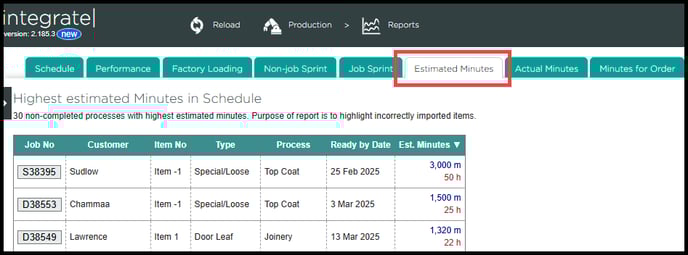
Step 2. Once you have navigated into the 'Reports' section, locate the 'Estimated Minutes' tab.
Alternatively you can add 'Production/Reports/EstimatedMinutes' to the end of your company URL in your browser.
E.G. https://Example.work/Production/Reports/EstimatedMinutes
Which will take you directly to the estimated minutes page.
What does this report show ?
The EMR ( estimated minutes report ) provides you with a list of the top 30 jobs with the highest estimated production minutes.
This report is typically used to help identify any jobs with incorrectly imported items.
You can directly view any job on this list inside the production schedule by clicking on the 'Job Number' box located on the left hand side of the report.