![End to End logo dark landscape cropped-01.png]](https://26925870.hs-sites-eu1.com/hs-fs/hubfs/End%20to%20End%20logo%20dark%20landscape%20cropped-01.png?height=40&name=End%20to%20End%20logo%20dark%20landscape%20cropped-01.png)
Key Points: DrawingBoard Frame and Ruler Settings
1. Access DrawingBoard frame and ruler settings.
Go to settings, then organisation, then DrawingBoard.
Key Points: Frame Display for Solid Profiled / Solid with Plant on Stop
1. Determine how solid casements for doors and windows are displayed.
Auto (recommended) - the width of the frame shown in the drawing depends on whether you are using internal or external view, and whether the sash is opening in or out.
Note: For direct glazed units, the larger, unprofiled frame will always be displayed, since the system cannot tell whether the stops are internal or external.


Profiled Jamb / Excl. stop - the drawing will always show the smaller, profiled frame width, regardless of viewpoint.
Jamb / Incl. stop - the drawing will always show the larger, unprofiled frame width, regardless of viewpoint.
Key Points: Frame Ruler Display for Solid Profiled / Solid with Plant on Stop
1. Determine how the rulers for the internal frame dimensions of solid frames are measured.
Auto (recommended) - the internal frame ruler will change depending on whether you are using internal or external view. To work properly, Frame Display for Solid Profiled / Solid with Plant on Stop should also be set to Auto.
Note: For direct glazed units, the measurement between the unprofiled jambs will always be given, since the system cannot tell whether the stops are internal or external.


Jamb / Incl. stop - the internal frame ruler will always measure between the wider, unprofiled jambs, giving a smaller internal frame measurement since the stops are excluded from the measurement.
Profiled jamb / Excl. stop - the internal frame ruler will always measure between the profiled jambs, giving a larger internal frame measurement since the stops are included in the measurement. If sash clearances are set to 0, the internal frame measurement will be equal to the sash width/height.
Centre - the internal frame rulers will measure from the outside of the frame to the midpoint of any transoms or mullions. If there are no transoms or mullions in the frame, this ruler will not appear.
Key Points: Frame Display for Solid Spiral / Hollow Box
1. Determine how sash windows are displayed when viewed internally.
Inner jamb + staff bead (recommended) - the system will draw a staff bead on the inside of the jamb when viewed internally. The width of the staff bead is equal to the size of the frame stops.


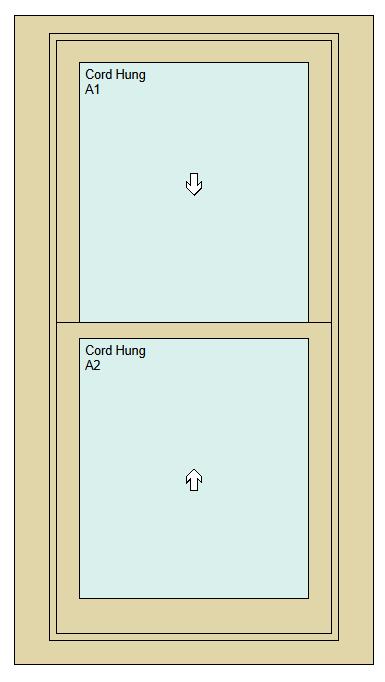
Inner jamb - the system will not draw a staff bead, revealing more of the sash when viewed internally.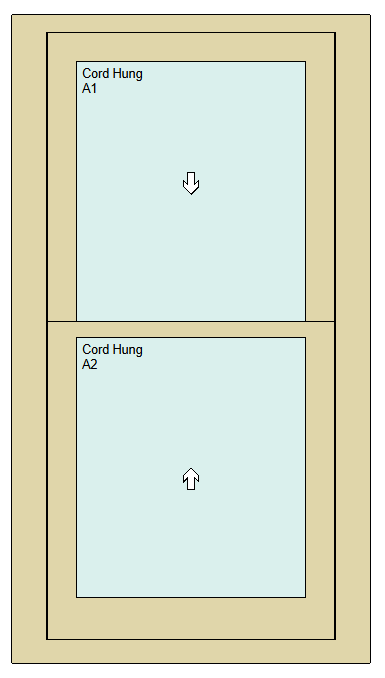
Key Points: Frame Ruler Display for Solid Spiral / Hollow Box
1. Determine how the internal frame ruler is measured for sash windows.
Inner jamb - the measurement will be taken between the narrower internal jambs, giving a bigger measurement. If the left and right mechanical clearance for the pair of sashes are set to 0 via the Default Values page, the measurement will be equal to the sash width.
Outer jamb - the measurement will be taken between the wider external jambs, giving a smaller measurement.


Centre - the measurement will be taken from the centre point of any mullions in the frame; otherwise, no ruler will be displayed.