![End to End logo dark landscape cropped-01.png]](https://26925870.hs-sites-eu1.com/hs-fs/hubfs/End%20to%20End%20logo%20dark%20landscape%20cropped-01.png?height=40&name=End%20to%20End%20logo%20dark%20landscape%20cropped-01.png)
Video Guide: Creating Quotes with Multiple Quantities
This video shows how to create quotes with multiple quantities, up to 100, of the same window or design.
Step-by-Step: Creating Quotes with Multiple Quantities
Step 1 - Open the drawing quantity menu. From the quote overview page, create a drawing as normal. Click Qty: 1 next to the price to open the drawing quantity menu.


Step 2: Change the drawing quantity. Change the quantity, any number up to a maximum of 100. Quantity information is displayed on the quote matrix page.

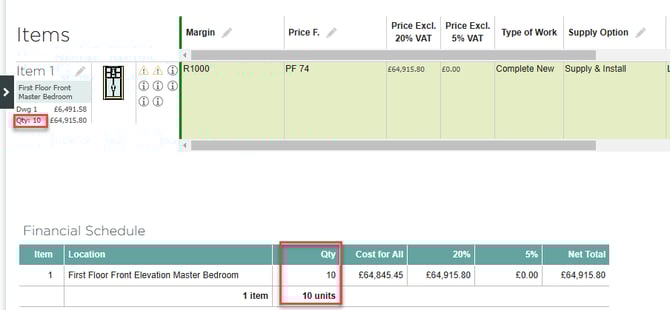
Step 3 - View item quantity.
On the item breakdown of the quote PDF, quantity will always display if the price is switched on.

Item quantity can also be viewed in the financial summary section of the quote. 
To enable item quantity in the financial summary section, go to quote settings and select the quantity column.

Step 4 - View the number of units.
The total number of units on the quote can be displayed at the bottom of the summary.
This is also enabled on the quote settings page: