![End to End logo dark landscape cropped-01.png]](https://26925870.hs-sites-eu1.com/hs-fs/hubfs/End%20to%20End%20logo%20dark%20landscape%20cropped-01.png?height=40&name=End%20to%20End%20logo%20dark%20landscape%20cropped-01.png)
The conditional tag within the rule editors appears when a pricing element will be either low or default VAT based on a condition.

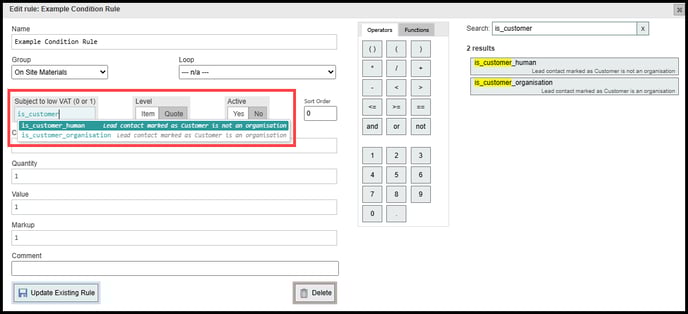
To create a conditional VAT rule within integrate you simply need to insert a Boolean value into the 'Subject to low VAT (1 or 0)' box within your rule. Ensure that the condition is set up so that when it's true your low VAT will trigger.
I.E if you want only low VAT for residential customers and want to exclude businesses you would use is_customer_human and NOT is_customer_organisation
Where would I use a conditional VAT rule?
An example case of this might be Draughtproofing a homeowners windows.
Draughtproofing is often subject to low VAT due to government grants, however in most cases only applies to residential users so you would want to exclude businesses from this.
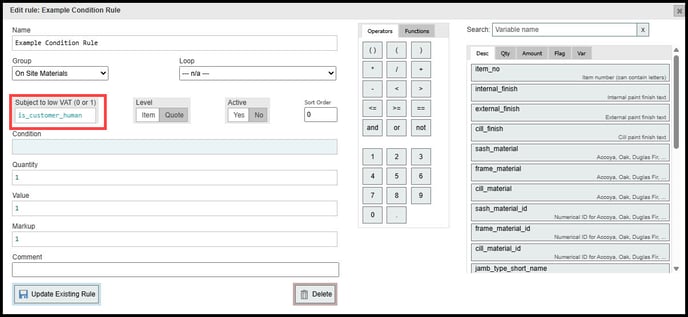
By using the Boolean variable 'is_customer_human' this allows us to only trigger the low VAT if the main contact for the lead is tagged as a human and not an organisation